
- Report "I paid for this" in LINE after every payment
- The organizer later retypes it all into Excel by hand
- Build formulas to split the bill (breaks when currencies mix)
- Work out "who pays whom" by hand
- You thought it was final, but edits sneak in and cause confusion
A group accounting app for organizers
Organizers, time to leave behind
Organizers, time to leave behind
pulling payment reports & retyping into Excel.
Picking up every "I paid for this" in the group chat one by one, retyping into Excel, tallying with formulas… That hassle often leads to miscalculations and arguments. With Tatewari-kun, you just log each payment on the spot. It works out who pays whom, and how much, automatically.
3 minfrom creating an event to entering data
1 screensee all settlement results at once
14 currenciesmulti-currency + FX supported
* Times vary depending on your environment and event size.
Say goodbye to "LINE + Excel" tallying.
Turn managing group money from report → retype → calculate → organize into simply "just log it."
- Just log each payment on the spot (or scan a receipt)
- Zero retyping — records become the tally directly
- Multi-currency & FX convert automatically, so nothing breaks
- Auto-calculate "who pays whom, how much" + minimal transfers
- Event lock & audit keep you safe after settling
The same settlement goes from report → retype → calculate → organize (4 chores) to just log it.
How it differs from typical bill-splitting apps
Tatewari-kun is more than a "bill-splitter" — as group accounting it covers recording, splitting, settling and auditing end to end.
Multi-currency + FX
Supports both a base and a local currency, with optional auto-fetched rates. Settle overseas trips and business trips with the same flow.
Event lock & audit log
After everyone agrees, lock the event to restrict edits. Changes are logged, structurally preventing "quiet edits after settling."
Pre-manage unregistered members
Add people without an account as participants by email. When they later sign up with the same email, everything carries over without interrupting your workflow.
| Feature | 立割くん | Typical bill-splitting apps |
|---|---|---|
| Multi-currency & FX | ◎ Supported | △ Often paid |
| Event lock & audit log | ◎ Supported | × Often unsupported |
| Pre-manage unregistered members | ◎ Supported | △ Limited |
| Settlement that minimizes transfers | ◎ Supported | ◎ |
| Weighted (shares) split | ◎ Supported | △ Limited |
| Auto-fill via receipt scanning | ◎ Supported | × Often unsupported |
The problems we set out to solve
Tatewari-kun is designed to reduce not just the splitting itself, but the effort of running an event.
Payment records scattered everywhere
Info spread across LINE, notes and word of mouth — the final tally easily falls apart.
Hard to manage people who join midway
If someone has no account, invitations tend to stall before you even start.
Changes creep in after settlement
Even when you think it's final, edits happen and you lose track of what's correct.
Tatewari-kun features
The core features available today, organized around real-world use.
Auto-fill via receipt scanning
Just snap a receipt and the store, amount and currency are read automatically — no typing, record on the spot.
Weighted (shares) split
Set shares per participant for a weighted split — "drinkers pay more," "organizer pays more" — or set everyone to 1 for an even split.
Email-based participant management
Add unregistered people as participants first; when they sign up later, everything carries over without interruption.
Payment entry made easy on mobile
A numeric keypad speeds up amount entry; pick who it's for with multi-select and finish on the spot.
Multi-currency and FX
Supports both a base and a local currency. Settle overseas trips and business events with the same flow.
Settlement with the fewest transfers
List who pays whom and auto-generate a settlement list with the fewest transfers. See both the detailed breakdown and the minimal transfers.
Reimbursement mode
No splitting. Just record who advanced how much, tick "Settled" once paid back, and see the unsettled balance at a glance on the settlement sheet.
In-app PDF preview
A clear flow even in PWA mode takes you smoothly from reviewing to saving.
Finalize by locking the event
Lock the event once settled; together with the audit log this prevents later editing mistakes.
Features on the roadmap
Weighted split is already available. Next we're tackling splitting by specifying each person's amount.
⚖
Split by specified amount
In addition to weighted split, we plan to support directly specifying each participant's amount — for fine-grained cases like "this person only had this one item."
* Listed features and timing may change depending on development.
Three simple steps
There's little to learn — use it in the same order your event unfolds.
Create an event
Set the event name, currency and participants. Reuse common setups with event copy.
Record payments on the spot
Enter the description, amount and targets and save. You can edit or delete from the payments list.
Settle and save a PDF
Review the final payments and export a PDF if needed. Lock the event afterward to fix the results.
Use cases
See the flow from creating an event to settling, by scenario, on real screens.
Splitting on overseas trips
Overseas trips require converting between local and base currencies. With Tatewari-kun, just set the FX rate and payments entered in the local currency convert to the base currency automatically. For multi-country trips, we recommend one event per country (currency), carrying participants over with event copy.
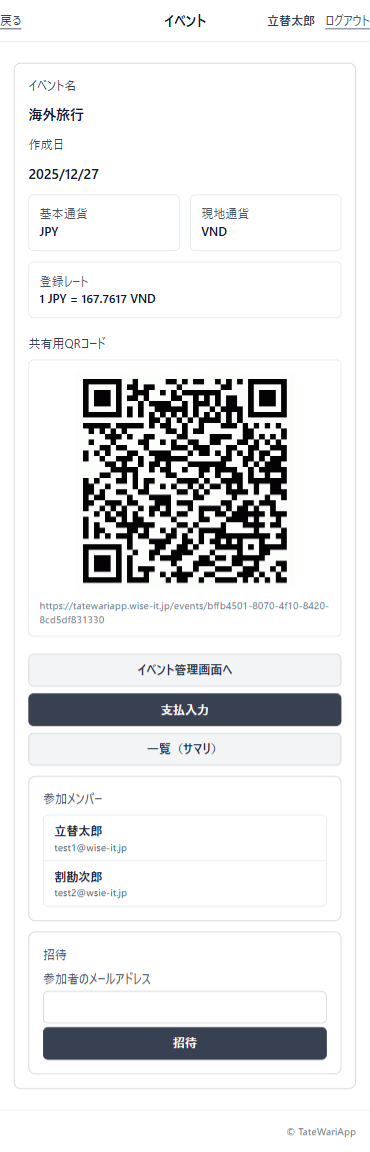
STEP 1 Create event
Set the base and local currencies and FX rate. Invite members by QR code and move on to entering payments.

STEP 2 Record payments
Amounts show in both local and base currencies. Record various expenses during the trip and check the total.
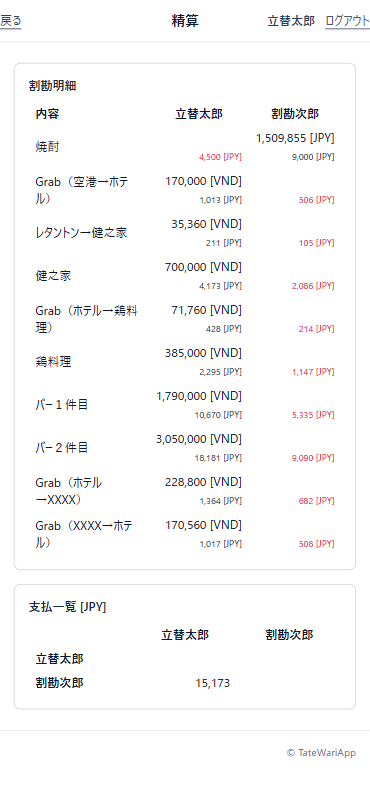
STEP 3 Settle
Automatically calculate who pays whom and how much. Local-currency payments convert to the base currency for a fair settlement.
Large parties, clubs & camps
Easily manage payments even for big gatherings. With event copy, creating events with the same members each time is smooth.
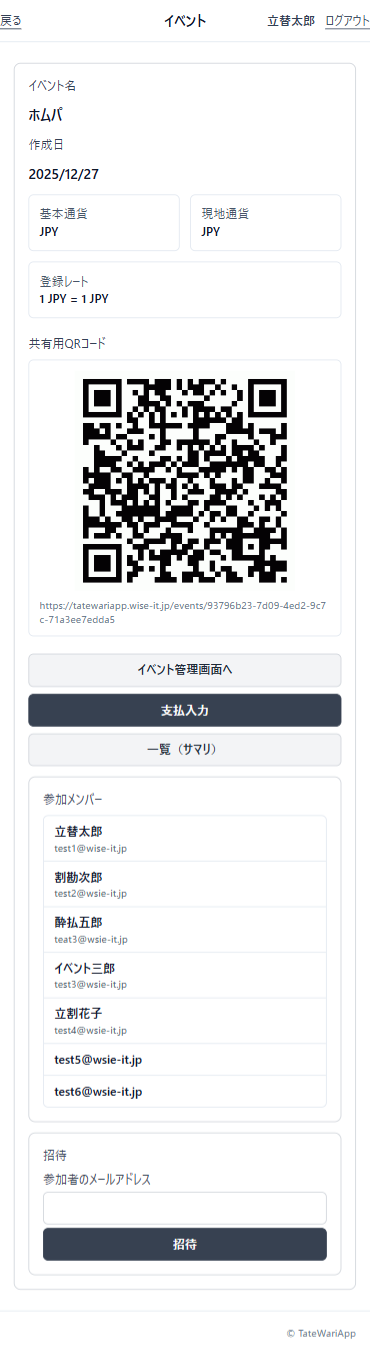
STEP 1 Manage members
Review participants in a list and move to entering payments. Even large groups stay easy to manage.
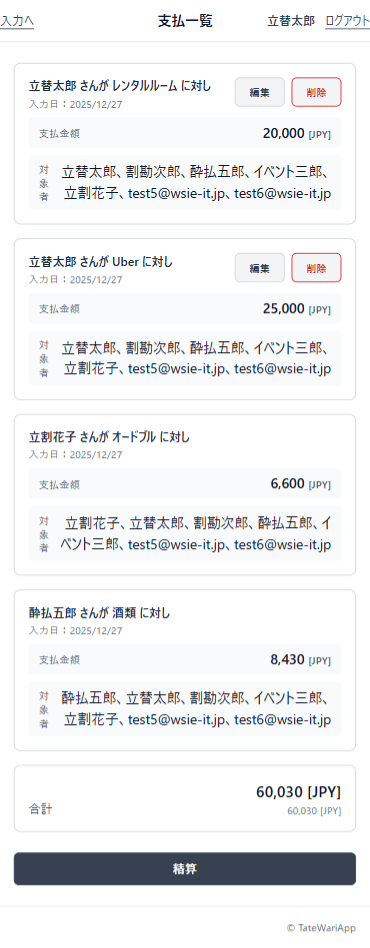
STEP 2 Record payments
See at a glance which payments each participant is included in. Editing and deleting are easy too.
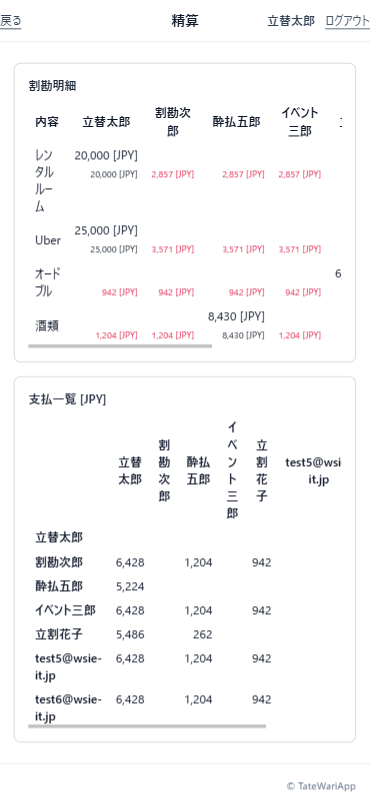
STEP 3 Settle
Calculate multiple payments together and list each participant's settlement amount. Split fairly even with many people.
Screen previews
See the flow of operations on real screens.
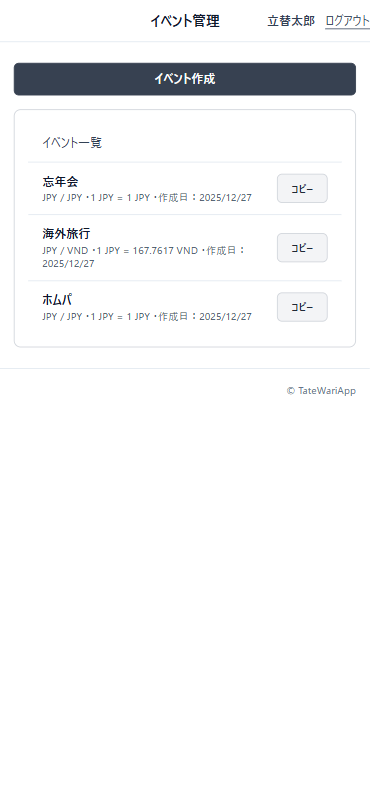
Event list
Manage active and closed events in one list. Copy to create the next event, too.
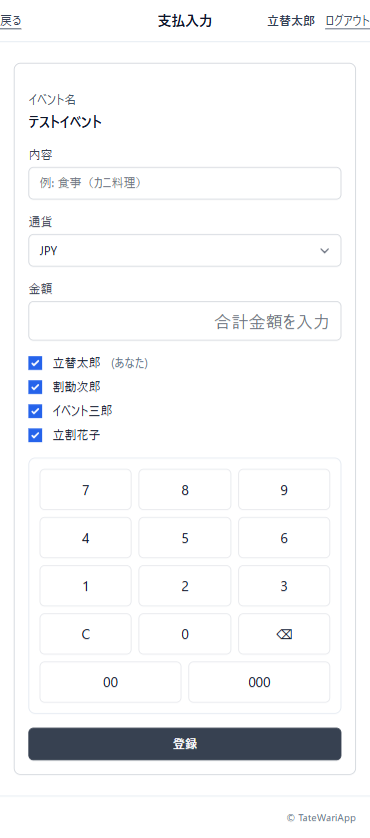
Payment entry
A keypad-centric UI speeds up mobile entry. Pick the targets and it reflects instantly.
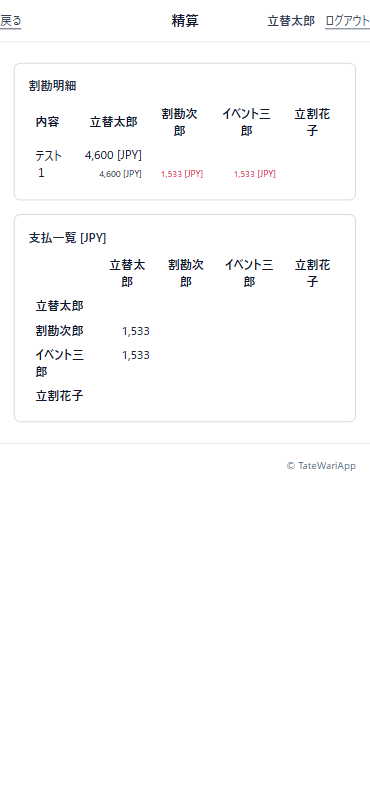
Settlement results
List the final payments and go all the way to PDF preview and download.
Information for peace of mind
We clearly state our operations, data handling and support policies to help you decide.
Data handling
Event, payment and participant data are stored to run settlements. You can delete events you no longer need.
Operational safety
Event lock and the audit log restrict and record changes to payments and participants after settling, reducing the risk of mistaken edits after agreement.
Onboarding support
For first-time setup, check operations via the manual and use cases. It also suits verification before team use.
Frequently asked questions
We've gathered the points people most often wonder about before starting.
Are invitation emails sent automatically?
No email is sent when you add a participant. Invite them using the join link (copy, share, or QR).
Can unregistered users join?
Yes. Register them as a participant by email first; when they later sign up with the same email, they are connected to the event.
Can I use it for overseas trip expenses?
Yes. It supports a base currency, a local currency and an FX rate (auto-fetch available), so you can enter amounts in the local currency and settle in the base currency.
Can it minimize transfers and split by ratio?
Both are supported. It can auto-generate a settlement list with the fewest transfers, and weighted split lets you split by ratio such as 'drinkers pay more' or 'the organizer pays more'. Splitting by directly specifying each person's amount is on the roadmap.
Can amounts be entered automatically from a receipt?
Yes. Take a photo of the receipt and the store, amount and currency are read and filled in automatically. If it can't be read, you can still enter the amount manually.
Does it work for multi-country trips?
We recommend creating one event per country (currency). Since event copy carries over participants, you can create the next country's event just by changing the currency and FX rate. Settling per country also keeps the breakdown clear.
For your next event, spend more time enjoying and less time tallying.
With Tatewari-kun, everything from entry to settlement happens in one place — multi-currency, lock and audit included — minimizing the organizer's burden.